Sunday, June 16, 2024

Tuesday, June 11, 2024
Normalization in DBMS
Problems: Redundancy
Different kinds of Normal Forms:
1NF, 2NF,3NF etc
Data Modelling
Star Schema
Star schemas denormalize the data, which means adding redundant columns to some dimension tables to make querying and working with the data faster and easier. The purpose is to trade some redundancy (duplication of data) in the data model for increased query speed, by avoiding computationally expensive join operations.
In this model, the fact table is normalized but the dimensions tables are not. That is, data from the fact table exists only on the fact table, but dimensional tables may hold redundant data.
Resources: https://www.databricks.com/glossary/star-schema
snowflake schema:
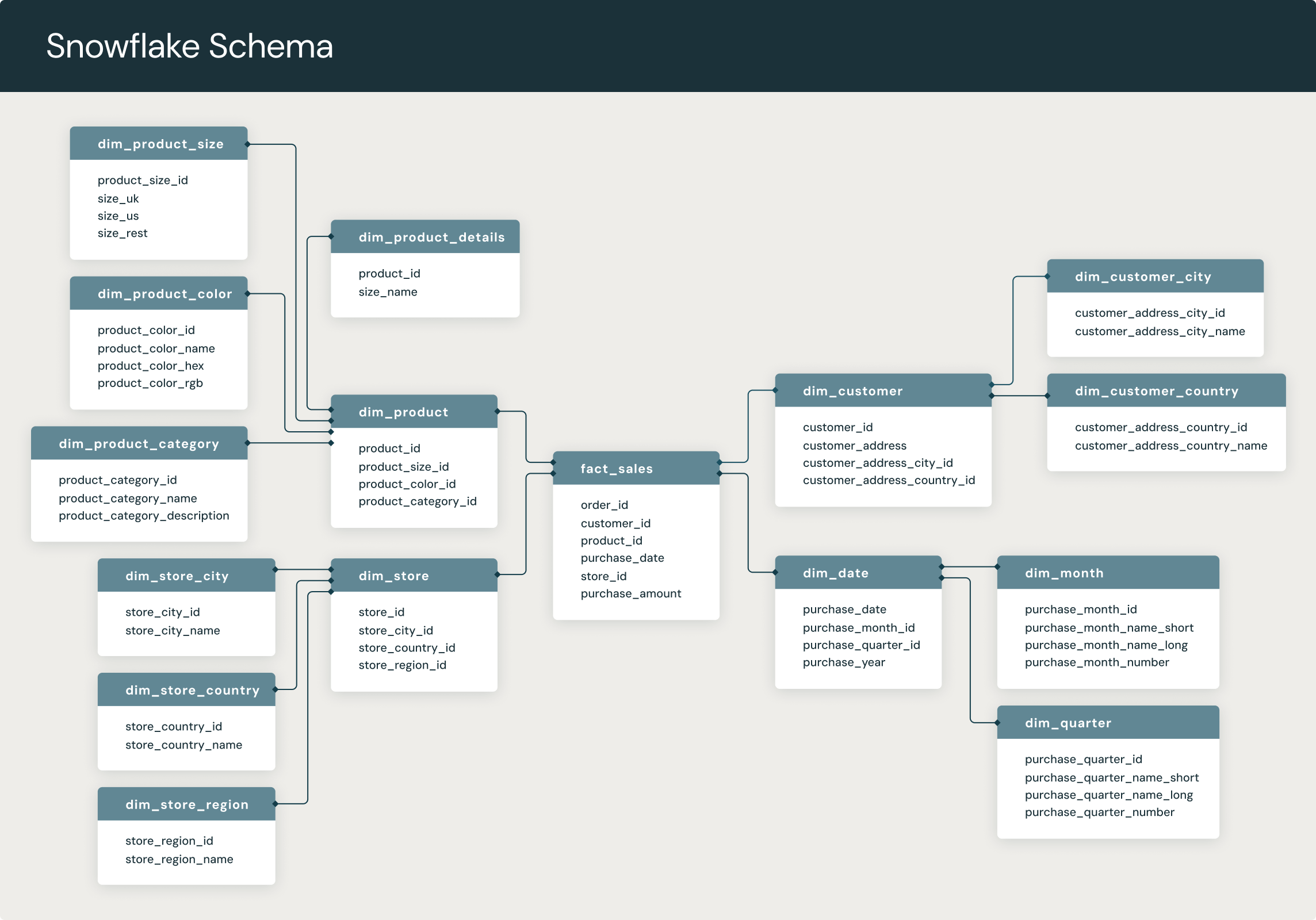
A snowflake schema is a multi-dimensional data model that is an extension of a star schema, where dimension tables are broken down into subdimensions. Snowflake schemas are commonly used for business intelligence and reporting in OLAP data warehouses, data marts, and relational databases.
In a snowflake schema, engineers break down individual dimension tables into logical subdimensions. This makes the data model more complex, but it can be easier for analysts to work with, especially for certain data types.
It's called a snowflake schema because its entity-relationship diagram (ERD) looks like a snowflake, as seen below.
Monday, June 10, 2024
Database Architecture
References: https://www.youtube.com/watch?v=9ToVk0Fgsz0
ETL Design Patterns
Data Governance
- Improved Data Management
- Provide meaning and quality of data, Improved Data Quality
- Regulatory, more consistent Compliance
- Reduced costs and Increased Value.
- Single source of Truth.
- Establishing Data ownership & Accountability
Data Lineage
Data Modeling
Normalization is the method of arranging the data in the database efficiently. It involves constructing tables and setting up relationships between those tables according to some certain rules. The redundancy and inconsistent dependency can be removed using these rules in order to make it more flexible.
There are 6 defined normal forms: 1NF, 2NF, 3NF, BCNF, 4NF and 5NF. Normalization should eliminate the redundancy but not at the cost of integrity.
- Normalization is the technique of dividing the data into multiple tables to reduce data redundancy and inconsistency and to achieve data integrity. On the other hand, Denormalization is the technique of combining the data into a single table to make data retrieval faster.
- STAR Schema, Snowflake Schema comes into Picture in this case.
What's the Difference Between a Data Warehouse, Data Lake, and Data Mart?
How to choose between star and snowflake schemas?
How to create a star schema?
Data lake vs. Data warehouse
What is the difference between a data lake and a data warehouse?
A data lake and a data warehouse are two different approaches to managing and storing data.
A data lake is an unstructured or semi-structured data repository that allows for the storage of vast amounts of raw data in its original format. Data lakes are designed to ingest and store all types of data — structured, semi-structured or unstructured — without any predefined schema. Data is often stored in its native format and is not cleansed, transformed or integrated, making it easier to store and access large amounts of data.
A data warehouse, on the other hand, is a structured repository that stores data from various sources in a well-organized manner, with the aim of providing a single source of truth for business intelligence and analytics. Data is cleansed, transformed and integrated into a schema that is optimized for querying and analysis.
Thursday, March 4, 2021
Spark Scala vs pySpark
Performance: Many articles say that "Spark Scala is 10 times faster than pySpark", but in reality and from Spark 2.x onwards this statement is no longer true. pySpark used to be buggy and poorly supported, but was updated well in recent times. However, for batch jobs where data magniture is more Spark Scala gives better performance.
Library Stack:
Pandas in Pyspark is an advantage.
Python's Visualization libraries complement pySpark. Where these are not available in Scala.
Python comes with some libraries that are well known for data analysis. Several Libraries are available like Machine learning and Natural Language Processing.
Learning python is believed to be easier than Scala.
Scala Supports powerful concurrency trough primitives like Akka's actors. Also has Future Execution context
Tuesday, March 2, 2021
Reconciliation in Spark
Input configuration as CSV and get primary keys for the respective tables and Updated_date
Source Unload - Select primarykeys, Updated_date from srcTbl1 where Updated_date between X and Y
Sink Unload - Select primarykeys, Updated_date from sinkTbl1 where Updated_date between X and Y
Recon Comparison Process:
Get Max Updated from srcTbl - val srcMaxUpdatedDate = srcDf.agg(max("Updated_date")).rdd(map(x => x.mkString).collect.toString
From Sink Table get only the columns whose Updated_date is less than Max Updated_date of Source.
val sinkDf = spark.sql("select * from sinkTbl where Updated_date <= ${srcMaxUpdatedDate}")
//This below function creates the SQL for comparision between source and sink tables and identifies if any of the records those were failed to get inserted to Sink table
keyCompare(spark,srcDf,sinkDf, primarykeys.toString.split(","))
def keyCompare(spark: SparkSession, srcDf: DataFrame, sinkDf: DataFrame, key: Array[String]): DataFrame = {
srcDf.createOrReplaceTempView("srcTbl")
sinkDf.createOrReplaceTempView("sinkTbl")
val keycomp = key.map(x => "trim(src." + x + ") = " + "trim(sink." + x + ")").mkString(" AND ")
val keyfilter = key.map(x => "sink." + x + "is NULL").mkString(" AND ")
val compareSQL = s" Select src.* from srcTbl src Left JOIN sinkTbl sink on $keycomp where $keyfilter"
println(compareSQL)
val keyDiffDf = spark.sql(compareSQL)
(keyDiffDf)
}
Sample Insert Compare would look like,
select src.* from srcTbl src left join sinkTbl sink on trim(src.PrimaryKEY1) = trim(sink.PrimaryKEY1) AND trim(src.PrimaryKEY2) = trim(PrimaryKEY2) where sink.PrimaryKEY1 is null and sink.PrimaryKEY2 is null
In the similar lines we can identify the records those were not updated during the delta process
select src.* from srcTbl src inner join sinkTbl sink on trim(src.PrimaryKEY1) = trim(sink.PrimaryKEY1) AND trim(src.PrimaryKEY2) = trim(PrimaryKEY2) where src.Updated_date != sink.Updated_date
def dateCompare(spark: SparkSession, srcDf: DataFrame, sinkDf: DataFrame, key: Array[String], deltaCol: String): DataFrame = {
srcDf.createOrReplaceTempView("srcTbl")
sinkDf.createOrReplaceTempView("sinkTbl")
val keycomp = key.map(x => "trim(src." + x + ") = " + "trim(sink." + x + ")").mkString(" AND ")
val compareSQL = s" Select src.* from srcTbl src Left JOIN sinkTbl sink on $keycomp where src.$deltaCol != sink.deltaCol"
println(compareSQL)
val keyDiffDf = spark.sql(compareSQL)
(keyDiffDf)
}
Wednesday, June 3, 2020
Handling Spark job Faliures

Output - The estimated amount of records for this task after Join operation in Size and record count.
Shuffle Read - This can be considered as input for this job as it represents the mount of data involved or considered as input for this Join.
Shuffle Spill(Memory) - The amount of RAM consumed for this operation.
Shuffle Spill (Disk) - This indicates the amount of data written to Disk for this operation. Typically, this is not an ideal case to spill records to Disk and indicates that this stage is processing more data than it's capacity and have high chances of failure. While processing, as the data is more than the capacity of fit into RAM for that container, so it is written to Disk in compressed format.
Below is the ideal case:

Solution 1:
set spark.sql.shuffle.partitions
eg:
spark.conf.set("spark.sql.shuffle.partitions", 200)
Solution 2: Divide and conquer Approach
This is typically needed when the data being handled is more than the allocated Queue size. This is a case which I faced in one of my places those I worked, where I had to process and ingest huge sets of data but the Queue size allocated for my team is less than the data.
Not to worry in such cases we can divide the data into parts and then insert.
Eg: A case where we read data from 25 tables(either hive or RDBMS) , Join all these and write the result to MongoDB and consider the record count is 500 Million. Max memory limit per executor in the Queue is 15 GB and this job fails at join phase.
So, divide the data to 10 equal parts and perform Joins on .5 Million records and ingest to MongoDB. Below are the steps to do this:
1. Create a temp table with only the primary keys and sort the keys in descending order.
2. Get Min and Max of the Primary keys and calculate the incrementaloffset by dividing it with the numParts which is 10 in this case.
Eg:
val numParts = 10
val incrementalOffSet = (maxPrimaryKeyVal - minPrimaryKeyValue)/numParts
Now incrementalOffSet = ~.5M
3. Do a broadcast Join between this temp table of parted data with the main table. On doing this the main table's 0.5 Million records only will be involved in the transformation.
Reason of doing Broadcast Join is that the temp table will have only the primary keys and for millions of records it's size would be in MB's only and is safe to do it.
In case, if the primary key is not numeric(happens in case of hive tables), can pick any other Unique key or in the worst case create a Row_Number on the sorted records. All the need is to have a sorted set of dividable rows.
Below is the sample code and can be extended,

In this way, write a window and loop through the splitted data and complete the operation. This approach is helpful where the transformation logic cannot be splitted and data can be splitted.
Another approach where the number of tables being Joined can be splitted into parts.
Eg: In this case we have 25 tables. so perform 5 tables join each time.
Understanding DAG:


Data Skewness :
Thursday, May 21, 2020
Thursday, May 7, 2020
Mongo Spark Connector
One of my Friend's Thomas has written a nice article in which he explained the same in an awesome manner. Please follow the link https://medium.com/@thomaspt748/how-to-load-millions-of-data-into-mongo-db-using-apache-spark-3-0-8bcf089bd6ed
I would like to add 3 Points apart from the one's explained by my friend.
1. Dealing with Nested JSON.
val foodDf = Seq((123,"food2",false,"Italian",2),
             (123,"food3",true,"American",3),
             (123,"food1",true,"Mediterranean",1))
        .toDF("userId","foodName","isFavFood","cuisine","score")
val foodGrpDf = foodDf.select($"userId", struct("score", "foodName","isFavFood","cuisine").as("UserFoodFavourites")).groupBy("userId").agg(sort_array(collect_list("UserFoodFavourites")).as("UserFoodFavourites"))
Reference: https://stackoverflow.com/questions/53200529/spark-dataframe-to-nested-json
Later the Dataframe can be written to Mongo Collection using Save API.
Eg:
MongoSpark.save(foodGrpDf .write.option("collection", "foodMongoCollection").mode("Append"), writeConfig)
Using this above function the Dataframe(foodGrpDf ) can be directly written to MOngo Collection(foodMongoCollection).
2. Creating spark session when Kerberos LDAP Authentication is enabled for mongodb.
authSource=$external&authMechanism=PLAIN has to be included in the URI.
Eg:
val mongoURL = s"mongodb://${mongouser}:${mongopwd}@${mongoHost}:${mongoPort}/${mongoDBName}.foodMongoCollection/"
val spark = Spark.Session.builder.appName("MongoSample").config("spark.mongodb.output.uri", mongoURL + "?authSource=$external&authMechanism=PLAIN").config("spark.mongodb.input.uri", mongoURL + "?authSource=$external&authMechanism=PLAIN").getOrCreate
3. Update existing Record in Mongo Collection
save() will act as Update as well. See the below code snippet to Read -> Update a value in DataFrame -> Save
val df4 = spark.read.format("com.mongodb.spark.sql.DefaultSource").option("database", "foodDB").option("collection", "foodMongoCollection").load()
val df5 = df4.filter(col("foodName") === "food3")
val df5Updated = df5.drop("isFavFood").withColumn("isFavFood", lit("American_Updated"))
df5Updated .show
MongoSpark.save(df5Updated.write.option("collection","foodMongoCollection").mode("Append"), writeConfig)
Tuesday, November 26, 2019
Updating data in a Hive table
This can be achieved with out ORC file format and transaction=false, can be achieved only when the table is a partitioned table. This is a 2 step process:
1. Create data set with Updated entries using Union of non-updated records and New record in the partition.
select tbl2.street,tbl2.city,tbl2.zip,tbl2.state,tbl2.beds,tbl2.baths,tbl2.sq__ft,tbl2.sale_date,tbl2.price,tbl2.latitude,tbl2.longitude,tbl2.type from (select * from samp_tbl_part where type = "Multi-Family") tbl1 JOIN (select * from samp_tbl where type = "Multi-Family") tbl2 ON tbl1.zip=tbl2.zip ///New Record
UNION ALL
select tbl1.* from (select * from samp_tbl_part where type = "Multi-Family") tbl1 LEFT JOIN (select * from samp_tbl where type = "Multi-Family") tbl2 on tbl1.zip=tbl2.zip where tbl2.zip is NULL; ////Non-updated records
2. Insert overwrite the partition.
Eg:
CREATE EXTERNAL TABLE `samp_tbl_part`(
`street` string,
`city` string,
`zip` string,
`state` string,
`beds` string,
`baths` string,
`sq__ft` string,
`sale_date` string,
`price` string,
`latitude` string,
`longitude` string)
PARTITIONED BY (
`type` string)
ROW FORMAT SERDE
'org.apache.hadoop.hive.serde2.lazy.LazySimpleSerDe'
STORED AS INPUTFORMAT
'org.apache.hadoop.mapred.TextInputFormat'
OUTPUTFORMAT
'org.apache.hadoop.hive.ql.io.HiveIgnoreKeyTextOutputFormat'
LOCATION
'hdfs://quickstart.cloudera:8020/user/hive/sampledata/realestate_part';
220 OLD AIRPORT RD AUBURN 95603 CA 2 2 960 Mon May 19 00:00:00 EDT 2008 285000 38.939802 -121.054575 Multi-Family
398 LINDLEY DR SACRAMENTO 95815 CA 4 2 1744 Mon May 19 00:00:00 EDT 2008 416767 38.622359 -121.457582 Multi-Family
8198 STEVENSON AVE SACRAMENTO 95828 CA 6 4 2475 Fri May 16 00:00:00 EDT 2008 159900 38.465271 -121.40426 Multi-Family
1139 CLINTON RD SACRAMENTO 95825 CA 4 2 1776 Fri May 16 00:00:00 EDT 2008 221250 38.585291 -121.406824 Multi-Family
7351 GIGI PL SACRAMENTO 95828 CA 4 2 1859 Thu May 15 00:00:00 EDT 2008 170000 38.490606 -121.410173 Multi-Family
CREATE EXTERNAL TABLE `samp_tbl`(
`street` string,
`city` string,
`zip` string,
`state` string,
`beds` string,
`baths` string,
`sq__ft` string,
`type` string,
`sale_date` string,
`price` string,
`latitude` string,
`longitude` string)
ROW FORMAT SERDE
'org.apache.hadoop.hive.serde2.lazy.LazySimpleSerDe'
WITH SERDEPROPERTIES (
'field.delim'=',',
'line.delim'='\n',
'serialization.format'=',')
STORED AS INPUTFORMAT
'org.apache.hadoop.mapred.TextInputFormat'
OUTPUTFORMAT
'org.apache.hadoop.hive.ql.io.HiveIgnoreKeyTextOutputFormat'
LOCATION
'hdfs://quickstart.cloudera:8020/user/hive/sampledata/realestate'
1139 CLINTON RD SACRAMENTO 95825 FL 4 2 1776 Multi-Family Fri May 16 00:00:00 EDT 2008 221250 38.585291 -121.406824
Complete Insert statement:
INSERT OVERWRITE TABLE samp_tbl_part partition (type) select tbl2.street,tbl2.city,tbl2.zip,tbl2.state,tbl2.beds,tbl2.baths,tbl2.sq__ft,tbl2.sale_date,tbl2.price,tbl2.latitude,tbl2.longitude,tbl2.type from (select * from samp_tbl_part where type = "Multi-Family") tbl1 JOIN (select * from samp_tbl where type = "Multi-Family") tbl2 ON tbl1.zip=tbl2.zip
UNION ALL
select tbl1.* from (select * from samp_tbl_part where type = "Multi-Family") tbl1 LEFT JOIN (select * from samp_tbl where type = "Multi-Family") tbl2 on tbl1.zip=tbl2.zip where tbl2.zip is NULL;
Monday, February 25, 2019
Configuring a Spark-submit Job
Configuring Spark-submit parameters
Before going further let's discuss on the below parameters which I have given for a Job.
spark.executor.cores=5
spark.executor.instances=3
spark.executor.memory=20g
spark.driver.memory=5g
spark.dynamicAllocation.enabled=true
spark.dynamicAllocation.maxExecutors=10
spark.executor.cores - specifies the number of cores for an executor. 5 is the optimum level of parallelism that can be obtained, More the number of executors can lead to bad HDFS I/O throughput.
More the cores, more the parallel tasks
spark.executor.instances - Specifies number of executors to run, so 3 Executors x 5 cores = 15 parallel tasks.
spark.executor.memory - The amount of memory each executor can get 20g(as per above configuration). Cores would be sharing this 20GB and as there are 5 cores each core/Task will get 20/5 = 4 GB.
spark.driver.memory - Usually this can be less as the driver manages the job and doesn't process the data. Driver also stores Local variables, needs larger space incase any Map/Array collection is allocated with large amounts of data. Usuall does Job allocation to executor nodes, DAG creation, writing Log, displaying in console etc
spark.dynamicAllocation.enabled - By default this is enabled and when there is a scope of using more resources than specified(when the cluster is free). The job will ramp up with the resources. Dominant resource calculator needs to be enabled to get the full power of Capacity. This will allocate executors and cores as per the ones we specified, if not enables default it will allocate 1 core per executor. Default is Memory based resource calculator.
spark.dynamicAllocation.maxExecutors - Can specify the maxExecutors in Dynamic allocation
spark.yarn.executor.memoryOverhead - The amount of off-heap memory (in megabytes) to be allocated per executor. This is memory that accounts for things like VM overheads, interned strings, other native overheads, etc. This tends to grow with the executor size (typically 6-10%).
Off-heap refers to objects (serialised to byte array) that are managed by the operating system but stored outside the process heap in native memory (therefore, they are not processed by the garbage collector)
Coming to the actual story of assigning the parameters.
Consider a case where data needs to be read from a partitioned table with each partition containing multiple small/medium files. In this case have Good executor memory, more executors and as usual 5 cores.
Similar cases as above but, not having multiple small/medium files at source. In this case executors can be less and can have good memory for each executor.
In case of incremental load where data pull is less, however needs to pull from multiple tables in parallel(Futures). In this case executors can be more, little less executor memory and as usual 5 cores.
Needs to consider amount of data being processed, the way joins are applied, stages in job, broadcast or not. Basically this goes as trail and error after analyzing the above factors and the best one can be chalked out in UAT environment.
Consider a 5 Node cluster with 12 cores in each node and 48 Gb RAM in each Node.A case when the complete cluster is allocated. Leave out 1 core and 1 GB for operational purposes.
Advantages:
Thin Executors:
Optimum Executors:
spark.driver.maxResultSize - Limit of total size of serialized results of all partitions for each Spark action (e.g. collect) in bytes. Should be at least 1M, or 0 for unlimited. Jobs will be aborted if the total size is above this limit. Having a high limit may cause out-of-memory errors in driver (depends on spark.driver.memory and memory overhead of objects in JVM). Setting a proper limit can protect the driver from out-of-memory errors.
Get Unravel Report and can tune accordingly.There is a good monitoring tool called sparklens which can monitor a job and provide it's analysis in the first run. This is an open source.
sparklens : https://docs.qubole.com/en/latest/user-guide/spark/sparklens.html
Sunday, January 13, 2019
Creating Spark Scala SBT Project in Intellij
Below are the steps for creation Spark Scala SBT Project in Intellij:
1. Open Intellij via Run as Administrator and create a New project of type scala and sbt.
If this option is not available, open Intellij and go to settings -> pluging and type the plugin Scala and install it.
Also Install sbt plugin from the plugins window.
2. Select scala version which is compatible with spark, eg if spark version is 2.3 then select scala version as 2.11 and not 2.12 as spark 2.3 is compatible with scala 2.11. So, selected 2.11.8
Sample is available under https://drive.google.com/open?id=19YpCwLzuFZSqBReaceVOFS-BwlArOEpf
Debugging Spark Application
Remote Debugging
http://www.bigendiandata.com/2016-08-26-How-to-debug-remote-spark-jobs-with-IntelliJ/
1. Generate JAR file and copy it to a location in cluster.
2. Execute the command,
export SPARK_SUBMIT_OPTS=-agentlib:jdwp=transport=dt_socket,server=y,suspend=y,address=4000
To write data to Hive tables from Spark Dataframe below are the 2 steps:
1. In spark-submit add the entry of hive site file as --files /etc/spark/conf/hive-site.xml
2. Enable Hive support in spark session enableHiveSupport(). eg:
val spark = SparkSession.builder.appName("Demo App").enableHiveSupport().getOrCreate()
Sample Code:
val date_add = udf((x: String) => {
val sdf = new SimpleDateFormat("yyyy-MM-dd")
val result = new Date(sdf.parse(x).getTime())
sdf.format(result)
} )
val dfraw2 = dfraw.withColumn("ingestiondt",date_add($"current_date"))
dfraw2.write.format("parquet").mode(SaveMode.Append).partitionBy("ingestiondt").option("path", "s3://ed-raw/cdr/table1").saveAsTable("db1.table1")